


How to Install a Car Battery: Easy Steps
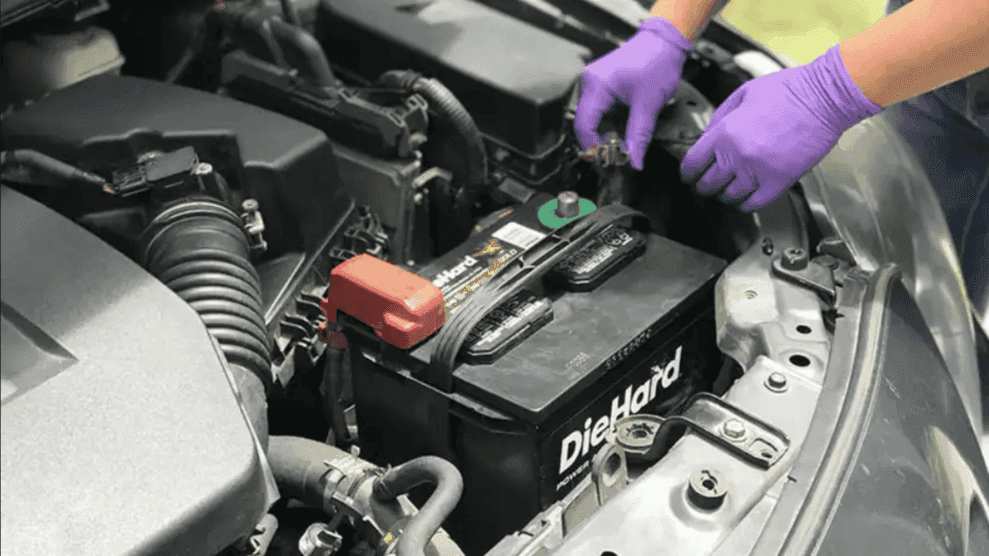
Photo Source/Copyright: Advance Auto Parts
Your car rarely dies without warning. A sluggish crank on a cold morning, a single click when you turn the key, or headlights that look tired at idle are generous heads-up signals from your battery. Learning how to install a replacement car battery isn’t a massive weekend project. Most of the job comes down to doing simple steps in the correct order. Grab a few basic tools, set aside a little time, and you’ll be in business; no vehicle lift or lifetime of shop experience required.
Gear Up Before You Pop the Hood
You don’t need fancy equipment for this task. Most of these items are likely sitting in your garage right now:
- Protection: Heavy work gloves and safety glasses.
- Wrench: The proper socket or wrench size for the terminal bolts and hold-down clamp.
- Terminal Brush: A specialized wire brush for scrubbing corrosion off battery clamps.
- Memory Saver (Optional): Plugs into the diagnostic port to keep power to electrical settings while the battery is out.
- Replacement Battery: Matched to your old unit’s specific group size and power rating.
Locating the Battery
Pop the hood first. Most vehicle batteries live there, tucked to one side of the engine bay under a removable plastic cover. If it isn’t under the hood, check the trunk, cargo area, under a floor panel, behind side trim, or beneath the rear seat. Hybrids frequently place batteries in these alternative locations.
Fortunately, many vehicles still provide jump points under the hood, so you aren’t left stranded. Your owner’s manual will pinpoint the exact spot in seconds.
Out With the Old One
Disconnect the negative cable first, always. Look for the minus sign stamped near the terminal rather than relying solely on cable color. Loosen the clamp and tuck the cable safely away from the post. This order prevents short circuits: once the ground is disconnected, a wrench slipping against the metal body frame has nowhere to arc. Next, remove the positive cable.
Unbolt the hold-down clamp or bar keeping the battery secure. Lift the battery straight up, keeping it upright so acid doesn’t slosh out onto your skin or paint. It’s heavier than it looks. Return the old battery to the auto parts store to reclaim your core charge deposit.
Clean the Tray and Clamps
Inspect the cable clamps and mounting tray before installing the new battery. White or blue-green crusty buildup indicates corrosion that interferes with electrical connections. Scrub it clean using a terminal brush, wipe away debris, and let it dry completely.
A simple mix of baking soda and water breaks down stubborn buildup. Check cables for cracks or fraying while the area is open.
Seat and Connect the New Battery
Installing the replacement requires reversing your removal steps:
- Set the new battery on the tray with terminals facing the same orientation as the old unit.
- Reinstall and tighten the hold-down bracket so the battery can’t shift while driving.
- Connect and tighten the positive (+) cable first.
- Connect and tighten the negative (−) cable last.
Ensure both clamps are snug without overtightening, then start the engine.
Modern Vehicle Considerations
Modern vehicles feature smarter electrical systems:
- Start-Stop Systems: AGM batteries must be replaced with another AGM unit to withstand frequent restart cycling.
- Battery Registration: Certain models require a scan tool to register new batteries so the alternator charging profile adapts.
- Resets: Expect to reset your clock and radio presets after power is disconnected.
- Hybrids/Electric Vehicles (EVs): These still use 12-volt batteries, but if integrated into high-voltage packs, replacement requires dealer service.
Professional Assistance
While many battery swaps finish in the driveway before your coffee cools, others require scan tools, trim removal, or hybrid system expertise. If your vehicle needs extra attention, our service team can test, install, and register the proper battery for you. Contact us to schedule a visit or ask questions.
More From Miami Lakes Automall
Coupe vs. Sedan: Spotting the Key Differences
Photo Source/Copyright: Dodge (left) Kia (right) Most drivers settle the coupe vs. sedan debate by counting doors. Two means coupe, four means sedan: case closed. Except it isn’t quite that simple. Browse any dealership lot today, and you’ll find sleek four-door cars sporting coupe badges without a hint of hesitation. The real distinction…
Discover the Best Features of the Chevrolet Trailblazer
Photo Source/Copyright: Chevrolet Subcompact crossovers all promise the same thing: SUV shape on a hatchback budget. Sorting the real contenders from the badge-engineered filler takes ten minutes with a spec sheet. The Chevrolet Trailblazer earns a longer look than most, mostly on what it hands you without asking extra. Two turbocharged three-cylinders, five…
Chevy Blazer Electric Vehicle: Top Features Revealed
Photo Source/Copyright: Chevrolet When looking for an electric SUV, there are usually only two questions to consider: how far it can go and how easily it can be charged. The Chevy Blazer electric vehicle deals with both of these by offering an EPA-rated range of 312 miles and a charge port, which connects…